Download bimmer-tool Lite free on android
APK file bimmer-tool lite 3.9.4-LHow to install APK / APKS / OBB file on Android
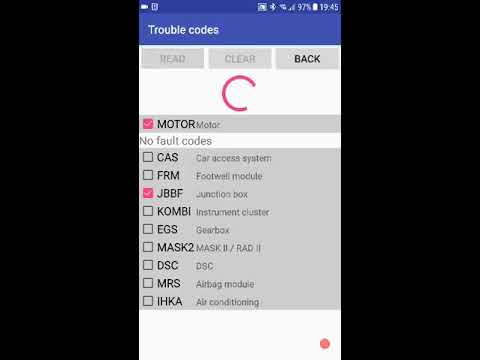

bimmer-tool allows to read & clear fault codes, request DPF regeneration, read engine live data and much more in BMW cars.
For cars below model year 2008 application functionality is limited and K+DCan USB cable connection is recommended. Wireless ELM adapter connection with cars below 2008 may not be possible or not all functions may be available.
Important: This application requires a reliable OBD adapter. K+DCan cable, ENET adapter (for F/G series) or below Bluetooth adapters are recommended:
- Vgate vLinker MC/FS/BM/FD https://www.vgatemall.com/products/
- UniCarScan UCSI-2000/USCI-2100: Choose setting: D-Can mode: MODE2 https://www.wgsoft.de/shop/obd-2-komplettsysteme/unicarscan/114/unicarscan-ucsi-2000-diagnoseadapter
https://www.bmdiag.co.uk/unicarscan-ucsi-2000-bluetooth-obd2-adapter
- Carista https://caristaapp.com/adapter
- Veepeak OBDCheck BLE https://www.veepeak.com/product/obdcheck-ble
Application allows to:
- read DPF regeneration status and detailed information
- request DPF regeneration
- reset DPF adaptation values (required after filter replacement)
- read exhaust fumes pressure
- read injectors adjustments
- read actual and expected values for air mass, intake manifold pressure, fuel pressure
- log data to CSV file for further analysis
- register battery replacement (without changing battery properties)
- reset lamps circuits blocked due to short-circuit error in E series
- reset oil/brakes service and change interval**
Supported OBD adapters
- K+D-Can USB: This is recommended and most reliable adapter. You will also need USB-OTG cable.
- ENET cable/Wifi Adapter: recommended for F & G series. ENET cable connections you need additionally USB-C to Ethernet adapter.
- ELM327 Bluetooth: Bluetooth connection may be slower than USB. Only genuine ELM327 or PIC18-based adapters will work. It may not work with older engines. More info below.
- ELM327 WiFi: Like ELM Bluetooth connection may be less stable. On some devices mobile data transmission needs to be disabled to use WiFi adapter.
If you have questions or need any help send me an email. You can find our address at the bottom of the page.
Quick start
1) Connect adapter to OBD II socket
2) Turn ignition on
3) Connect adapter to your phone:
* USB: Connect adapter to the phone using USB-OTG cable. Phone will ask which app to start - choose bimmer-tool app.
* Bluetooth: Go to phone Bluetooth setting. Search for Bluetooth devices and pair the adapter with the phone (PIN is usually 0000 or 1234).
* Wifi: Turn mobile data transmission off. Turn WiFi on and search for available WiFi networks. Connect the phone to the adapter's WiFi.
4) Start the app, go to 'Car' and choose model and year.
5) Go to 'Connection' and choose connection type, adapter type and communication protocol.
6) Tap 'Connect' button.
**Limitations:
For models below 2008 and e46/e39/e83/e53 the app requires K+DCan cable connection and only engine ECU is supported. Connection using a wireless ELM adapter may not be possible.
Common problems
- Engine 'No response' error in cars up to 2007 and BT/Wifi adapter. If this error occurs from time to time, try selecting ATWM option under advanced connection settings.
- No connection: If adapter & protocol settings are correct and app still cannot connect to the car try force stop all diagnostic applications in application manager (including bimmer-tool) or restart the phone and try to connect again.
Why this app requires permissions?
- Storage: required for USB adapters support
- Photos / Media / Files: allows to create CSV files
- Pair with Bluetooth devices/access Bluetooth settings: required for Bluetooth adapters support
- Full network access: required for WiFi adapters support
- Approximate location: In theory, it is possible to find approximate location using Bluetooth, however this app does not read/use location.
F11 - manual control of the rear axle suspension bellows
- LicenseFree
- File namebimmer-tool lite
- File Version3.9.4-L
- Package namepl.pw.btool.lite
- Size10 MB
- UploadedNovember 14, 2026
- Android6.0 or later

- CategoryAuto & Vehicles
- Developerbimmer-tool
- Developer sitehttps://bimmer-tool.com
- Developer emailbtool.expert@gmail.com
- md5 hash0144d1250d4f85b83bd07946524f2444
- Architecture-
- Permissionsshow (10)
